


CI/CD Pipeline for Laravel Projects: A Practical Guide
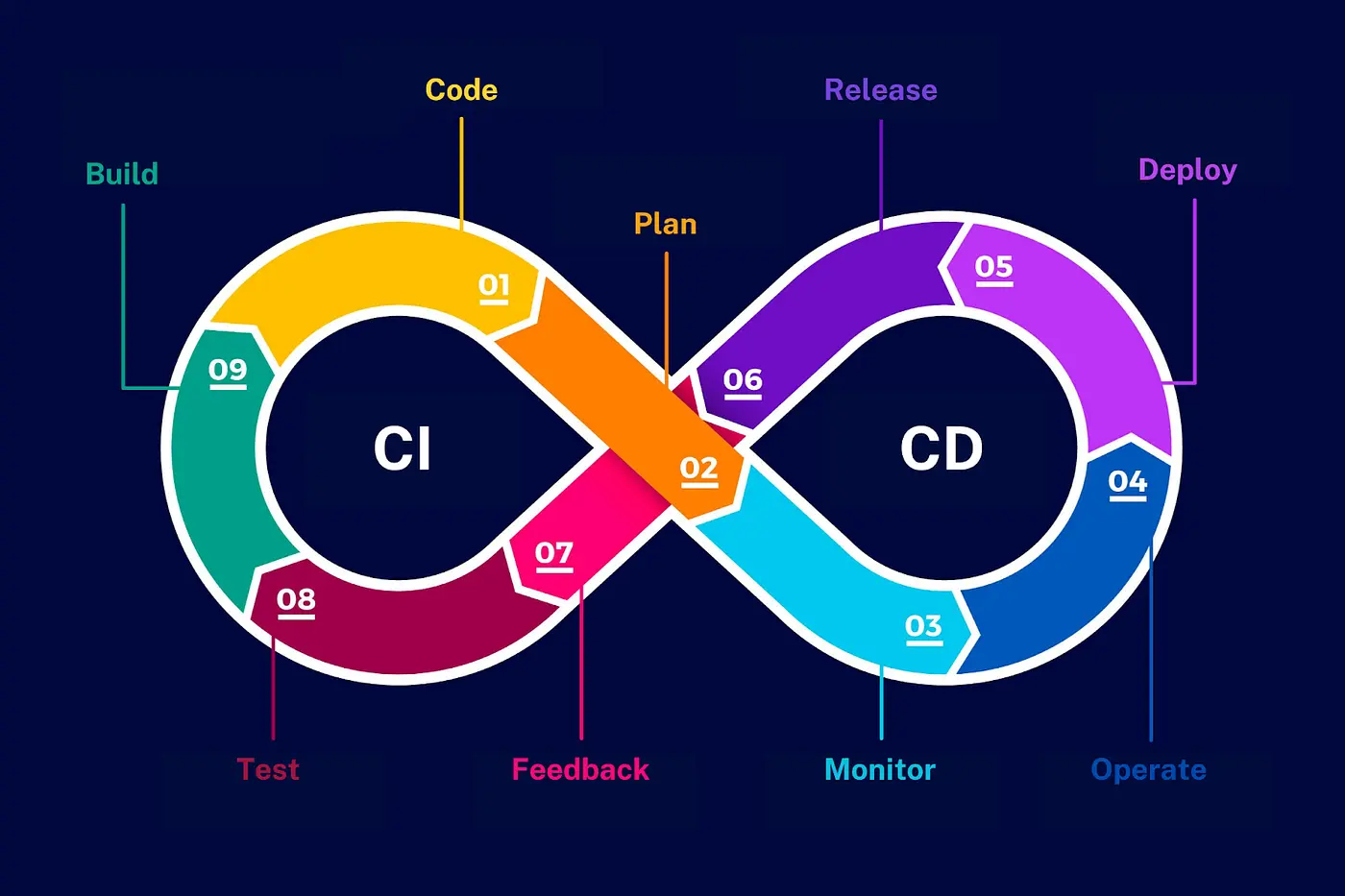
For any online businesses using digital platforms, the speed and reliability of web application updates are crucial. Previously, we were talking about the role of Laravel, a prevalent PHP framework, that allows developers to build refined applications efficiently. But as Laravel applications grow and handle increased user traffic, the demands for faster, more reliable deployment processes also increase rapidly. And at that phase, Laravel needs Enter DevOps, particularly CI/CD.Let’s get to know CI/CD a little better:Continuous Integration (CI) is a software development practice where developers frequently integrate their code changes into a shared repository, it allows teams to detect and address issues early in the development cycle. The primary goal of CI is to improve code quality and reduce integration problems that can arise when multiple developers work on the same project. CD-Continuous Deployment is the practice of automatically deploying code changes to a production environment after they pass the CI process.CD ensures that new features, bug fixes, and improvements are continuously delivered to users without manual intervention.
CI/C DevOps bridges the gap between software development and IT operations, organizing workflows and improving collaboration. It introduces automation through CI/CD, a practice that keeps new code updates flowing smoothly into production, continuously tested and ready for release.
So, today, you will learn how to implement CI/CD Pipeline for Laravel step by step.
Setting Up CI/CD for Laravel (Step-by-Step)
Setting Up CI in Laravel Project
First, to implement CI in a Laravel project, you need to set up an automated pipeline that builds, tests, and validates code changes. In order to implement CD in a Laravel project, you need to extend the CI pipeline to include automated deployment steps.
Prerequisites you need
- Version Control: Use Git for version control and a platform like GitHub, GitLab, or Bitbucket to host your repository.
- CI/CD Service: Choose a CI/CD tool such as GitHub Actions, GitLab CI/CD, or Jenkins.
- Hosting Platform: Decide where you want to deploy your application (e.g., Laravel Forge, AWS, DigitalOcean).
Setting Up CI for Laravel
- Initialize Git: Ensure your project is under version control.
- Configure GitHub actions by creating a workflow file: In your Laravel project, create a directory named .github/workflows and add a YAML file for the workflow, e.g., laravel-ci.yml.
- Add Tests: Ensure you have tests written in Laravel. Place them in the tests directory.
Setting Up CD for Laravel
- Choose a Deployment Method like e.g Laravel Forge: An excellent tool for deploying Laravel applications.
- Manual Scripts: Alternatively, you can write your own deployment scripts using tools like Docker, Kubernetes, or simple SSH scripts.
- Deployment Script for GitHub Actions – Create Deployment Workflow: Add another YAML file in .github/workflows, e.g., deploy.yml.
Secure Your Deployment
- SSH Keys: Ensure your CI/CD service can access your server using SSH keys
- Secure Storage: Store sensitive information such as database credentials and API keys securely using GitHub Secrets, GitLab Variables, or an equivalent.
Monitoring and Maintenance
- Monitoring tools for application performance: Use tools like New Relic, Datadog, or Sentry to monitor application performance and errors.
- Logging and alerts: Configure alerts for critical issues using the monitoring tools mentioned.
Implement CI/CD for Laravel with Intactdia
The whole process of implementing CI/CD for Laravel projects can significantly enhance development efficiency, code quality, and deployment speed. Hire skilled Laravel developers of Intactdia to build robust, scalable solutions tailored to your needs. Elevate your development process and achieve your business goals with Intactdia.